YouTube Shorts Music Downloader & Convert to MP3 Online
Extract the music or sound from any YouTube Short and save it as an MP3 at 320, 256, 192, 128, 96 or 64 kbps, or as the original M4A audio with no conversion — online, free, straight from the URL, on any device.
How to Convert YouTube Shorts to MP3
-
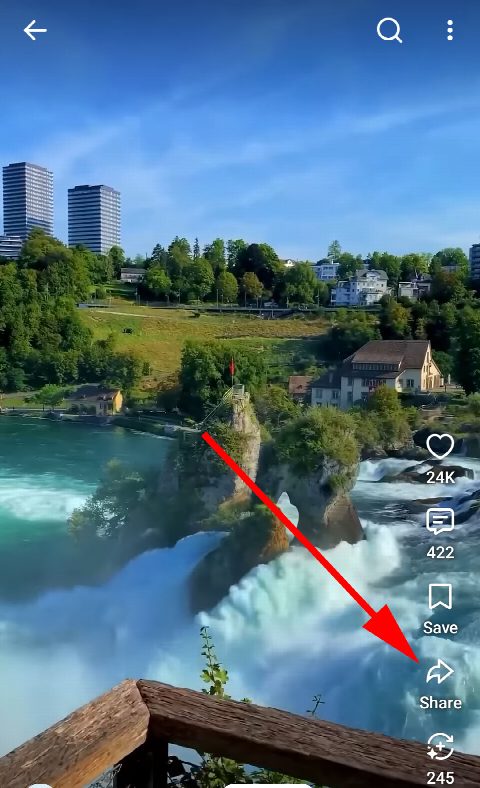
Open the Short
In the YouTube app or a browser, open the Short whose music you want and tap Share, the arrow in the row of buttons beside the video.
-
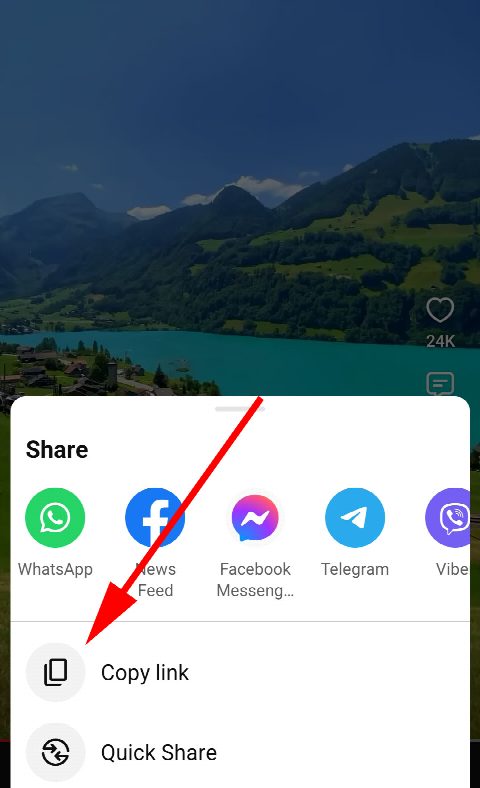
Copy the link
In the menu that opens, choose Copy link. The address looks like youtube.com/shorts/…
-
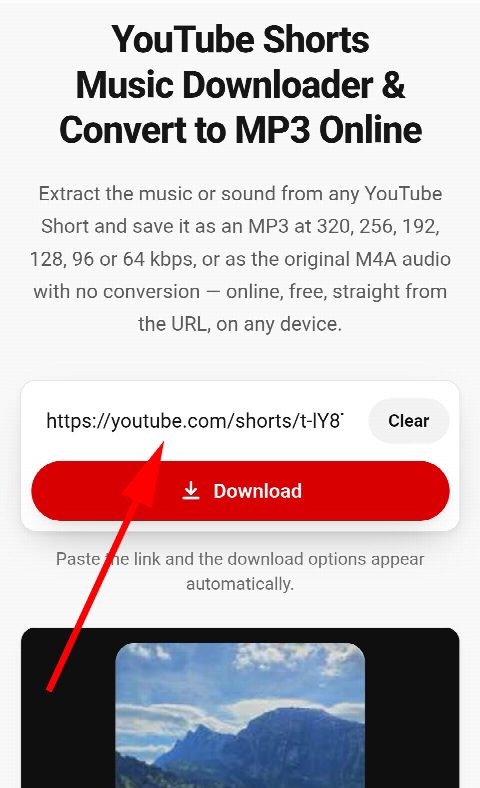
Paste and download
Paste the link into the field above — the Short is found automatically and the audio starts being extracted straight away. Choose an MP3 at 320, 256, 192, 128, 96 or 64 kbps, or the original M4A to keep the audio exactly as YouTube stores it. The file is ready in seconds.


Download Music and Audio from YouTube Shorts
-
Convert to MP3 online from URL
Turn any Short into a high quality MP3 in your browser — no software to install and nothing to configure. Paste the URL and download.
-
MP3 at 320, 256, 192, 128, 96 or 64 kbps
Pick the bitrate you need: 320 kbps for the best quality MP3, 192 or 128 kbps for a good balance, 96 or 64 kbps for a small ringtone or a slow connection.
-
Original audio in M4A
Prefer no conversion at all? Take the AAC track exactly as uploaded, in an M4A file that plays on iPhone, Android and every desktop player.
-
Free, no limits
Extract audio from as many Shorts as you like. No account, no subscription, no watermark on anything.
-
Any device
Works online on iPhone and iPad (iOS), Android phones and tablets, Windows, macOS and Linux — anywhere there is a browser.
-
The video too
The same result card offers the Short itself as an HD MP4 or WebM, so you can save the music and the video from one link.
YouTube Shorts MP3 Downloader for Any Device
MP3 or M4A — which one to choose
YouTube stores the sound of a Short as an AAC stream at 128 kbps. Our audio downloader gives it to you two ways. The M4A is that stream untouched — the original quality, in a container that iPhone, Android, Windows and macOS all play. The MP3s are converted from it at a constant 320, 256, 192, 128, 96 or 64 kbps, for car stereos, older players and apps that only accept MP3.
Which bitrate? 320 kbps is the largest and the one most players label as top quality; because the source is 128 kbps AAC, nothing above 192 kbps sounds different, so 192 or 128 kbps is the sensible everyday choice at half the size. 96 and 64 kbps are for a ringtone, a chat message or a slow connection. If you plan to edit the audio or keep the truest copy, take the M4A — it is the only file here that has not been converted at all.
Extracting music from Shorts on iPhone and Android
On iOS, Safari saves the MP3 to the Files app. From there you can open it in any music or ringtone app, or share it. On Android the file goes to Downloads and shows up in your music player on its own.
Everything happens online: the extraction runs on our server, so the phone only downloads the finished file. That is why it works the same on an old Android as on the newest iPhone, and why there is no app to install.
What about the music’s rights?
Many Shorts use licensed songs from YouTube’s library, and others carry the creator’s own audio. Downloading a track for personal listening is one thing; reusing it in your own content may need permission from whoever owns it. Please respect the creators’ and rights holders’ terms.
Frequently asked questions
How do I convert a YouTube Short to MP3?
Copy the Shorts link, paste it into the field on this page and press the MP3 bitrate you want. The audio is extracted online and the file downloads in a few seconds.
What is the difference between MP3 and M4A here?
The M4A is the original AAC audio exactly as YouTube stores it, with no conversion. The MP3s are converted from that original for players and apps that need MP3.
Which MP3 bitrate should I choose?
You can pick 320, 256, 192, 128, 96 or 64 kbps. YouTube’s source audio is 128 kbps AAC, so 192 or 128 kbps already preserves everything in it; 320 kbps is for players and uploads that ask for it, and 96 or 64 kbps keep the file small for ringtones and messaging.
Can I get just the music without the voice?
No. The audio track is a single mix, and the sound is extracted as it was uploaded. Separating music from speech would require re-processing the audio, which this tool does not do.
Does it work on iPhone and Android?
Yes. On iOS the MP3 is saved to the Files app; on Android it goes to Downloads. Nothing needs installing on either.
Is it legal to download music from Shorts?
Saving a copy for personal use is generally fine; reusing music that belongs to someone else in your own content may need their permission. Respect the rights holders’ terms.
FromYT.net
Download YouTube Shorts Online in HD MP4
Paste a YouTube Shorts link and save the video as a free HD MP4 with audio in any quality from 144p to 1080p and beyond — or as WebM, MP3 or the original M4A. No watermark, no app, no sign-up. Works on any device, iOS and Android included.