YouTube Shorts Ringtone Maker: Cut a Short to M4R or MP3
Paste a YouTube Shorts link, pick the best 30 seconds with two sliders and download a ringtone ready for your phone — M4A or M4R for iPhone, MP3 for Android — faded in and out if you like. Free, online, with no app to install.
How to Make a Ringtone from a YouTube Short
-
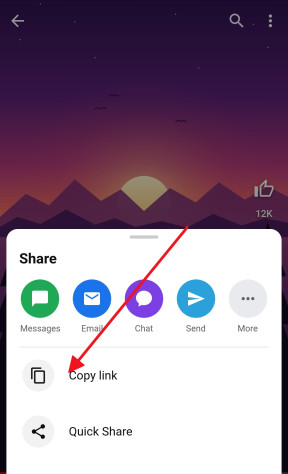
Copy the Short’s link
In the YouTube app, tap Share under the Short and choose Copy link. Any YouTube video up to 3 minutes long works too — music clips included.
-
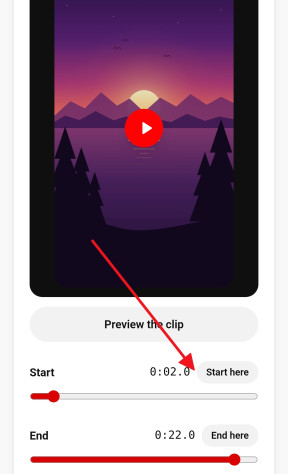
Pick the best part
Paste the link above. Drag the Start and End sliders, or play the Short and press Start here and End here; Preview the clip plays it on a loop, the way your phone will.
-
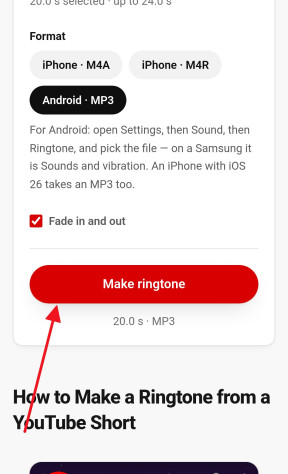
Download it for your phone
Choose iPhone (M4A or M4R) or Android (MP3), leave Fade in and out on, and press Make ringtone. The file downloads in a few seconds.


Ringtones for iPhone (M4R) and Android (MP3)
Phones take ringtones in different shapes, so the ringtone maker offers three:
- M4A for an iPhone with iOS 26 or later — open it in the Files app, tap Share and choose Use as Ringtone. iOS takes up to 30 seconds this way.
- M4R for an iPhone through a computer — the classic iPhone ringtone file, added in Finder on a Mac or in the Apple Devices app on Windows, up to 40 seconds long.
- MP3 for Android — Samsung, Pixel, Xiaomi and every other Android phone list an MP3 as a ringtone, a notification sound or an alarm.
All three are cut from the Short’s original audio and encoded once, at 192 kbps — more than a phone’s speaker can tell apart.
Cut the Best Part: Start, End and Fade
Most songs and sounds take a few seconds to get going, and the part people remember — the drop, the chorus, the punchline — is rarely at 0:00. Drag the sliders to it, or play the Short in the preview and press Start here and End here at the right moments; both move in tenths of a second.
Fade in and out softens up to the first and last second and a half, so the ringtone does not start mid-word at full volume or stop with a click. Turn it off for a sound that should hit at once, such as an alert.
Shorts BGM and Music as a Ringtone
Shorts are where songs and background music go viral before anyone knows their names — a trending sound, a remix, a line from a film. If you can hear it in a Short, you can make it your ringtone: paste the Short’s link here instead of hunting for the full track. A Shorts BGM ringtone works the same way whatever the language of the song, Hindi, Tamil and Telugu hits included.
For the whole sound rather than a clip, the Shorts to MP3 page saves it at up to 320 kbps.
How to Set Your New Ringtone
On an iPhone with iOS 26 or later, open the M4A in the Files app, tap Share and choose Use as Ringtone; it then shows up under Settings → Sounds & Haptics → Ringtone. With an older iOS, import the file into GarageBand and share it from there as a ringtone, or add the M4R through a computer.
On Android, open Settings → Sound → Ringtone — Sounds and vibration on a Samsung — and tap the + or “My sounds” to pick the MP3 from your phone.
Step by step, with where each setting hides on each phone: ringtone on iPhone, ringtone on Android and a YouTube song as your alarm.
Is It Okay to Use Music from Shorts as a Ringtone?
A ringtone made for your own phone is personal use, and that is how most people treat it. Sharing or selling ringtones made from someone else’s song is a different matter and needs the rights holder’s permission. Sounds from your own Shorts and royalty-free music are always yours to use.
Step-by-step guides
Frequently asked questions
How long can a ringtone be?
Up to 40 seconds here. An iPhone takes 40 seconds through a computer and 30 seconds through Use as Ringtone in iOS 26; Android has no fixed limit, but a ringtone only plays while the phone rings, and 30 seconds is plenty.
M4R, M4A or MP3 — which should I pick?
An iPhone with iOS 26 or later: M4A. An iPhone through a computer: M4R. Android: MP3.
Can I set it on an iPhone without a computer?
Yes. With iOS 26 or later, use Share → Use as Ringtone in the Files app. With an older iOS, GarageBand — Apple’s free app — turns the file into a ringtone on the phone itself.
Why doesn’t my ringtone show up?
On an iPhone, the clip is probably longer than the 30 seconds Use as Ringtone takes, or the file is not in the Files app. On Android, make sure the MP3 is on the phone itself; some phones list only the files in their Ringtones folder.
Can I add a fade in and out?
Yes — Fade in and out is on unless you switch it off, and softens up to a second and a half at each end.
Does it work with any Short?
Any public Short with sound, and any YouTube video up to 3 minutes long. Private and age-restricted videos cannot be opened.
Is the ringtone maker free?
Yes — no account, no app, nothing added to the sound and no limit on how many ringtones you make.
More free YouTube tools
- Shorts Downloader Save a Short as an HD MP4 with sound, from 144p up to 4K. Open →
- Shorts to MP3 Take the sound of a Short as an MP3 up to 320 kbps or the original M4A. Open →
- Thumbnail Downloader Every thumbnail size of a video or a Short, up to 1280×720, and the vertical Shorts cover. Open →
- Shorts to Normal Video Open any Short in the regular YouTube player, with a seek bar, speed and quality controls. Open →
- Transcript & Subtitles The text of a Short or any video from its captions, as TXT, SRT or VTT. Open →
- Shorts to GIF Cut any moment of a Short into an animated GIF, with no watermark. Open →