YouTube Shorts to Normal Video Converter
Paste a YouTube Shorts link and get the same video as a normal watch link — in the regular player, with a seek bar, playback speed, the quality menu, captions and comments. No extension, no app and nothing to install.
How to Convert a Short to a Normal Video
-
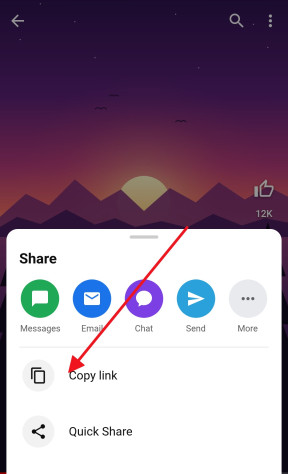
Copy the Short’s link
In the YouTube app, tap Share under the Short and choose Copy link; in a browser, copy the address bar. It looks like youtube.com/shorts/…
-
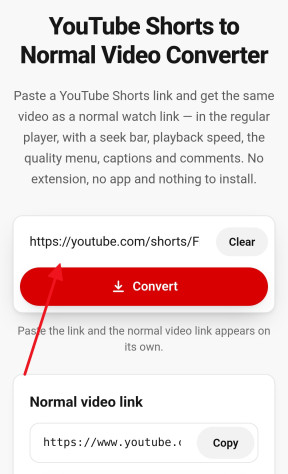
Paste it above
Paste the link into the field at the top of this page. The normal video link, youtube.com/watch?v=…, appears straight away.
-
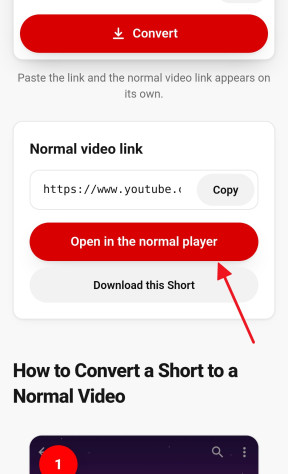
Open or copy it
Press Open in the normal player to watch the Short with every control of the regular player, or click the link to copy it and share it with someone else.


Change the Link Yourself: /shorts/ to /watch?v=
A Short and a normal video are the same upload — only the address decides which player YouTube opens it in. So the converter does nothing you could not do by hand: take the 11-character ID after /shorts/ and put it after /watch?v= instead.
-
youtube.com/shorts/aBcD3fGh1jKopens the Shorts player -
youtube.com/watch?v=aBcD3fGh1jKopens the normal player
Anything after a question mark in a Shorts link, such as ?feature=share or ?si=…, is tracking and can be left out. Editing the link like this works in every browser, on a computer and on a phone.
One-Click Bookmarklet: Open Any Short in the Normal Player
If you watch Shorts on a computer and want the normal player every time, you do not need a “Shorts to normal video” extension. Drag the button below to your bookmarks bar; whenever a Short is open, click the bookmark and the same video reloads in the normal player.
Drag this button to your bookmarks bar. Then, on any Short, click the bookmark to open it in the normal player.
Shorts → NormalA bookmarklet is a bookmark that runs one line of code on the page in front of you — this one only rewrites the address. It asks for no permissions, cannot read anything in the background and works the same in Chrome, Firefox, Edge and Safari. If the bookmarks bar is hidden, Ctrl+Shift+B shows it in most browsers (Cmd+Shift+B on a Mac).
What the Normal Player Gives You
The video does not change — it is the same file at the same quality. What changes is everything around it:
- A seek bar, to jump to any moment instead of waiting for the loop to come round
- Playback speed, to slow a tutorial down or speed a long Short up
- The quality menu, to pick 1080p or save data with a lower resolution
- Captions with their settings, and full screen, theater mode and picture-in-picture on a computer
- The description, comments and channel in the usual layout, without the next Short starting when you scroll
A Short loops on its own in the Shorts player. In the normal player it stops at the end, and Loop is a right-click away on a computer.
On iPhone and Android
The YouTube app usually shows a Short in the Shorts player whatever link it is opened from, so on a phone the normal player lives in the browser. Touch and hold Open in the normal player and choose Open in New Tab, so the link opens in Safari or Chrome rather than being handed to the app.
For the full desktop player with every menu, ask the browser for the desktop site: in Safari it is under the page menu in the address bar, and in Chrome it is the Desktop site box in the ⋮ menu.
Frequently asked questions
Do I need an extension to watch Shorts as normal videos?
No. All a “Shorts to normal video” extension does is change /shorts/ to /watch?v= in the link. Paste the link here, edit it by hand, or drag the bookmarklet on this page to your bookmarks bar for one-click switching.
Does it work in Firefox, Safari and Edge?
Yes. The converter runs in any browser, and the bookmarklet works in Chrome, Firefox, Edge and Safari alike — there is no store to install it from and nothing to update.
Can I make the YouTube app open Shorts in the normal player?
The app has no setting for it and usually keeps a Short in the Shorts player. Open the converted link in Safari or Chrome instead — touch and hold the button and choose Open in New Tab.
Does converting change anything on YouTube?
No. Nothing is uploaded or changed: the link is rewritten in your browser, and the video is the same one, from the same channel, at the same quality.
Does it work with links to normal videos and live streams?
Yes. A normal video link comes back as it is, and a youtube.com/live/… link becomes its watch link too.
Can I download the Short instead?
Yes — save it as an HD MP4 with sound, or take its audio as an MP3. The Download this Short button under the converted link does the first in one tap.
More free YouTube tools
- Shorts Downloader Save a Short as an HD MP4 with sound, from 144p up to 4K. Open →
- Shorts to MP3 Take the sound of a Short as an MP3 up to 320 kbps or the original M4A. Open →
- Thumbnail Downloader Every thumbnail size of a video or a Short, up to 1280×720, and the vertical Shorts cover. Open →
- Ringtone Maker Cut the best seconds of a Short into an iPhone or Android ringtone. Open →
- Transcript & Subtitles The text of a Short or any video from its captions, as TXT, SRT or VTT. Open →
- Shorts to GIF Cut any moment of a Short into an animated GIF, with no watermark. Open →