YouTube Thumbnail Downloader: Save Any Thumbnail in HD
Paste a link to a YouTube video, Short or live stream and get its thumbnail in every size YouTube keeps — full HD 1280×720, 640×480, 480×360 and smaller — plus the vertical 1080×1920 cover of a Short. Free, instant and nothing to install.
How to Download a YouTube Thumbnail
-
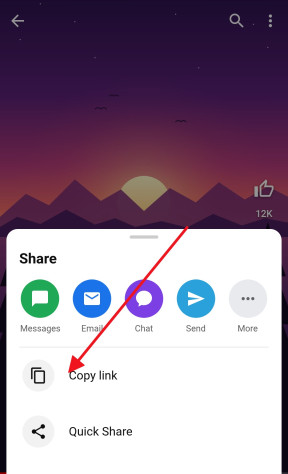
Copy the link
In the YouTube app or a browser, tap Share under the video or Short and choose Copy link. The address from the browser bar works as well, and so does the 11-character video ID on its own.
-
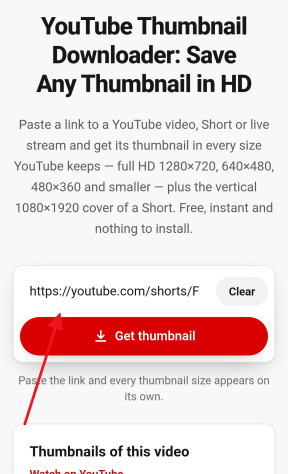
Paste it above
Paste the link into the field at the top of this page. The thumbnail grabber looks the images up straight away — there is nothing else to press.
-
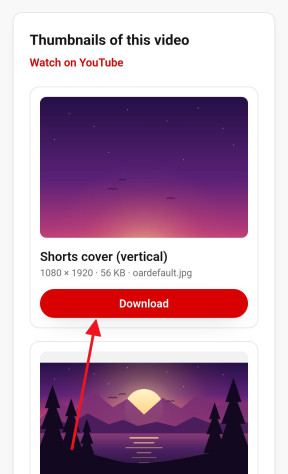
Save the size you need
Every size YouTube has for that video appears with its dimensions. Press Download to save the JPG, or tap a thumbnail to see it full size.


Every Thumbnail Size YouTube Stores
YouTube does not keep one thumbnail per video but a set of copies, each under its own file name on YouTube’s image server. This downloader asks for every one of them and lists only those that exist, so what you see is exactly what YouTube has for that video.
| File | Dimensions | Shape | When it exists |
|---|---|---|---|
maxresdefault.jpg |
1280 × 720 | 16:9, full HD | Videos uploaded in HD and videos with a custom thumbnail |
sddefault.jpg |
640 × 480 | 4:3, with bars | Almost always |
hqdefault.jpg |
480 × 360 | 4:3, with bars | Always |
mqdefault.jpg |
320 × 180 | 16:9 | Always |
default.jpg |
120 × 90 | 4:3, with bars | Always |
oardefault.jpg |
1080 × 1920 | 9:16, vertical | Shorts only |
The 4:3 sizes carry black bars above and below a widescreen picture. That is how YouTube stores them, not something added here; for a clean 16:9 image take maxresdefault.jpg or mqdefault.jpg.
Older videos, uploads made in low resolution and many Shorts never got a 1280 × 720 copy. When YouTube has no HD thumbnail for a video, it is not offered: the largest size listed is the largest that exists. A site that promises a “4K thumbnail” is upscaling one of these files — YouTube does not keep thumbnails in 4K.
Downloading Thumbnails from YouTube Shorts
A Short has two kinds of thumbnail. The usual set in the table is cut to the same 16:9 and 4:3 shapes as any video, so a portrait Short comes out with its top and bottom cropped away or with wide bars at the sides. Next to those, YouTube keeps a vertical cover for most Shorts, oardefault.jpg, at 1080 × 1920 — the full-height image you see in the Shorts shelf. When a Short has one, this Shorts thumbnail downloader lists it first.
Paste the Short’s link the way the Share button gives it, youtube.com/shorts/…, or in any other form: the same video is found either way. To save the Short itself rather than its picture, use the Shorts downloader.
YouTube Thumbnail Size, Dimensions and Aspect Ratio
Making a thumbnail of your own? The numbers YouTube asks for match its largest stored copy: 1280 × 720 pixels, a 16:9 aspect ratio and at least 640 pixels in width. Upload it as a JPG, PNG or GIF. The long-standing limit is 2 MB per image, and YouTube has begun to accept larger files on some channels, so go by the message YouTube Studio shows when you upload.
Downloading a few thumbnails from videos in your niche is a quick way to study what works at this size: how much text fits, how large a face has to be, and how the picture still reads when it is shrunk to the small frame next to a search result.
Save Thumbnails on iPhone, Android and PC
On a computer, Download saves the JPG to your Downloads folder in Chrome, Edge, Firefox or Safari, with no extension to add.
On an iPhone or iPad, Safari asks whether to download the file and keeps it in the Files app. To put the image straight into Photos, tap the thumbnail instead, then touch and hold the full-size picture and choose Save to Photos.
On Android, the JPG goes to Downloads and appears in your gallery. Tapping the thumbnail and then holding the full-size image offers Download image as well.
Can You Use a Downloaded Thumbnail?
A thumbnail is part of the creator’s work and is covered by copyright just like the video. Saving one to look at, to use as a reference for your own design, or to show in a review or a news piece about that video is generally accepted; putting someone else’s thumbnail on your own video or selling it is not. Your own thumbnails are always yours to download — useful when the original file has been lost.
Frequently asked questions
Can I download a YouTube thumbnail in 4K?
No — YouTube does not store thumbnails in 4K. The largest widescreen copy is 1280 × 720 (maxresdefault.jpg), and the largest image of any kind is the vertical 1080 × 1920 cover that most Shorts have. Anything sold as a 4K thumbnail has been upscaled from one of these.
Why is there no HD 1280 × 720 version?
YouTube makes the HD copy only for videos uploaded in HD or given a custom thumbnail, and many Shorts and older videos have none. When it is missing, the largest size shown is the largest one that exists.
Does it work for Shorts and live streams?
Yes. Paste a youtube.com/shorts/…, youtube.com/live/…, youtube.com/watch?v=… or youtu.be/… link, or just the video ID. A Short also gets its vertical cover when YouTube has one.
Can I get the thumbnail of a private or unlisted video?
An unlisted video works if you have its link, because its thumbnail is public. Private and deleted videos usually have their thumbnails taken down with them, and then there is nothing to download.
Does the thumbnail grabber work on iPhone and Android?
Yes, in any mobile browser, with no app. On an iPhone, tap the thumbnail, then touch and hold the full-size image and choose Save to Photos to put it straight into your camera roll.
What format are the thumbnails in?
JPG, exactly as YouTube serves them. The files are not resized or recompressed here, so you get the same quality YouTube shows.
Do I need an extension or an account?
No. There is nothing to install and nothing to sign up for: paste the link, and the thumbnails appear.
Is it legal to download YouTube thumbnails?
Downloading a thumbnail to view it or to learn from it is generally fine. Reusing someone else’s thumbnail on your own content needs their permission, the same as any other image.
More free YouTube tools
- Shorts Downloader Save a Short as an HD MP4 with sound, from 144p up to 4K. Open →
- Shorts to MP3 Take the sound of a Short as an MP3 up to 320 kbps or the original M4A. Open →
- Ringtone Maker Cut the best seconds of a Short into an iPhone or Android ringtone. Open →
- Shorts to Normal Video Open any Short in the regular YouTube player, with a seek bar, speed and quality controls. Open →
- Transcript & Subtitles The text of a Short or any video from its captions, as TXT, SRT or VTT. Open →
- Shorts to GIF Cut any moment of a Short into an animated GIF, with no watermark. Open →