Convert YouTube Shorts to GIF Online
Paste a YouTube Shorts link, pick the moment you want with two sliders and turn it into an animated GIF — up to 30 seconds long, 240 to 640 pixels wide, at the frame rate you choose. Free, with no watermark and no sign-up.
How to Make a GIF from a YouTube Short
-
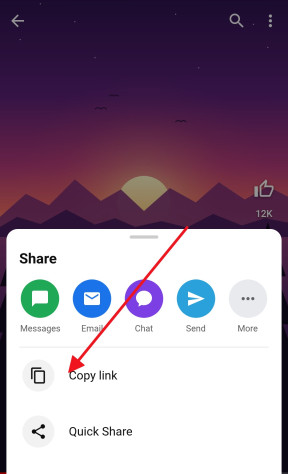
Copy the Short’s link
In the YouTube app, tap Share under the Short and choose Copy link. A link to any YouTube video up to 3 minutes long works as well.
-
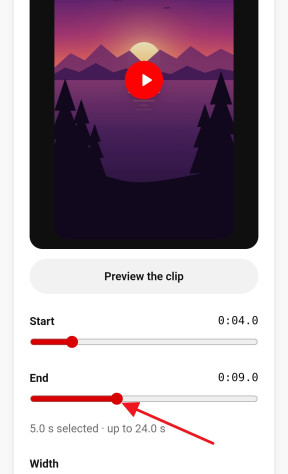
Pick the moment
Paste the link above and drag the Start and End sliders to the part you want. Preview the clip plays it round, as the GIF will.
-
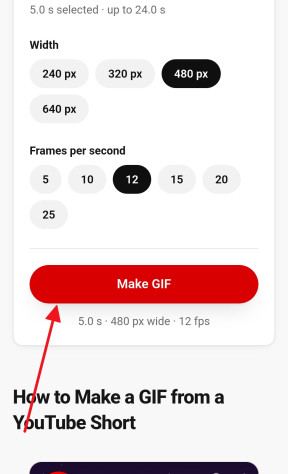
Make and save the GIF
Choose the width and the frame rate and press Make GIF. The GIF downloads on its own as soon as it is made — a few seconds for most clips.


Choose the Clip, Size and Frame Rate
A GIF can be up to 30 seconds long, cut to a tenth of a second. The width sets how large it is: 240 or 320 pixels for a reaction in a chat, 480 for most uses, 640 when the detail matters. The frame rate decides how smoothly it plays: 10 to 12 frames per second looks like a classic GIF, 20 to 25 comes close to the video itself.
Every extra second, pixel and frame makes the file heavier, because a GIF stores each frame as a picture of its own, with none of a video’s compression. If a GIF comes out too heavy to keep, the maker says so — make it shorter, narrower or slower and try again. A few seconds at 480 pixels and 12 frames per second is a good place to start.
No Watermark, No Sign-Up, No App
The GIF is the clip and nothing else: no logo in a corner, no account to create, no app or extension to install, and no limit on how many you make. The YouTube to GIF converter works in any browser — Chrome, Safari, Firefox or Edge — on iPhone, Android, Windows and Mac.
GIF or MP4: Which One to Share
A GIF has no sound and weighs far more than a video of the same clip, but it plays on its own, loops forever and goes anywhere an image does: Discord, Slack, Reddit, iMessage, forums, email and documents.
If you need the sound, or a sharper picture in a smaller file, save the Short as an MP4 video instead. Some apps, WhatsApp among them, turn a GIF into a short video on their side anyway.
Which Links Work
Paste a Shorts link the way the Share button gives it, youtube.com/shorts/…, or a youtu.be or watch link. Any public video up to 3 minutes long can become a GIF; longer videos, and private or age-restricted ones, cannot be opened here.
Need a still picture rather than a moving one? The thumbnail downloader saves a video’s cover image in every size YouTube keeps.
Frequently asked questions
Is the YouTube to GIF converter free?
Yes, with no watermark, no account and no limit on how many GIFs you make.
How long can the GIF be?
Up to 30 seconds, cut from anywhere in a video up to 3 minutes long. Shorter GIFs are lighter and load faster — a few seconds is usually enough.
Why did my GIF come out too large?
Every frame of a GIF is a full picture, so the length, the width and the frame rate all add up. Make the clip shorter, pick a smaller width or fewer frames per second, and try again.
Does the GIF have sound?
No — a GIF cannot carry sound. For the clip with its audio, download the Short as an MP4.
Does it work on iPhone and Android?
Yes. The GIF downloads as soon as it is made. On Android it appears in your gallery; on an iPhone, Safari keeps it in the Files app — to put it in Photos, touch and hold the finished GIF on the page and choose Save to Photos.
Can I make a GIF from a long YouTube video?
The GIF maker opens videos up to 3 minutes long — every Short and many music clips. Longer videos are not accepted here.
Can I add text or subtitles to the GIF?
Not here: the GIF is the picture exactly as it is in the video. Text that is part of the Short itself stays in the GIF.
More free YouTube tools
- Shorts Downloader Save a Short as an HD MP4 with sound, from 144p up to 4K. Open →
- Shorts to MP3 Take the sound of a Short as an MP3 up to 320 kbps or the original M4A. Open →
- Thumbnail Downloader Every thumbnail size of a video or a Short, up to 1280×720, and the vertical Shorts cover. Open →
- Ringtone Maker Cut the best seconds of a Short into an iPhone or Android ringtone. Open →
- Shorts to Normal Video Open any Short in the regular YouTube player, with a seek bar, speed and quality controls. Open →
- Transcript & Subtitles The text of a Short or any video from its captions, as TXT, SRT or VTT. Open →